












Bundling and subscriptions are two of the most effective levers a Shopify merchant has for AOV and retention, and combining them multiplies the effect. But before you can “bundle and subscribe,” two more basic questions usually come first, how do you actually set up subscriptions on Shopify, and can a customer buy a one-time item alongside a subscription in the same cart?
This guide covers all three: setting up subscriptions, mixed cart checkout, and how to bundle products for recurring delivery.
What Are Subscription Bundles?
A subscription bundle combines multiple products into a single offer that customers receive on a recurring basis. Instead of buying items individually each month, they subscribe to a curated package, saving time and often money.
Example: A skincare store bundles a cleanser, toner, and moisturizer, delivered every 30 days at a 10% discount. This is different from a regular bundle, it's tied to recurring billing and long-term retention, not a one-time purchase.
Why it's powerful:
- Higher order value per purchase
- Predictable recurring revenue
- Stronger customer loyalty
- Reduced repeat acquisition costs
How to Set Up Subscriptions on Shopify
Before you can bundle anything for recurring delivery, subscriptions need to be turned on. You have two starting points:
Option 1: Shopify's Native Subscriptions (Free)
Since 2023, Shopify has offered a free, built-in Shopify Subscriptions app built on its own Selling Plans API no third-party app required to get started.
- Install the free Shopify Subscriptions app from the Shopify App Store.
- From your Shopify admin, go to Products, and select the product you want to sell as a subscription.
- In the Purchase options section, create a selling plan group define your billing interval (e.g., every 2 weeks, every month) and the discount (10–15% is typical for consumables).
- Choose whether the product is subscription-only, or sellable as both a one-time purchase and a subscription most stores should leave both options on to avoid losing customers who aren't ready to commit.
- Assign the selling plan to any additional products you want included.
- Save. Customers will now see a "one-time purchase" vs. "subscribe & save" toggle directly on the product page.
This native option handles the essentials well: selling plans, Shop Pay-powered recurring billing, and a basic customer portal where subscribers can skip, pause, or cancel without contacting support.
Option 2: Third-Party Subscription Apps
Once you need more advanced billing logic, bundled box-building, loyalty integration, or deeper retention tooling, merchants typically move to a dedicated subscription app Rekitr, Recharge, Bold Subscriptions, or Appstle, among others. These plug into the same underlying Subscription Contract API, meaning (in their modern versions) they still run inside Shopify's native checkout rather than redirecting customers elsewhere. Pricing usually scales with subscription revenue (a base monthly fee plus a percentage of recurring sales), so it's worth starting with the free native app and migrating only once you hit its limits.
Mixed Carts: Selling One-Time and Subscription Items Together
One of the most-asked questions about Shopify subscriptions is whether a customer can buy a one-time product and a subscription product in the same checkout the answer is yes, and this is called a mixed cart.
How it works
Modern subscription apps built on Shopify's Subscription Contract API process subscription line items as part of the same cart as regular one-time items. At checkout, both are consolidated into a single transaction the customer pays once, and the order is fulfilled and billed correctly on the backend, with recurring items continuing to bill automatically going forward. This all happens inside Shopify's own native checkout no separate domain, no redirect which also means it benefits from Shop Pay and Shopify's built-in fraud protection.
Why Subscription Bundles Increase AOV and Retention
Subscription bundles increase cart value by encouraging customers to purchase multiple related products together instead of individually. Combined with recurring delivery, this also increases lifetime value and reduces repeat acquisition costs. Customers convert faster because bundles reduce decision fatigue and present a complete solution rather than a wall of individual choices.
The Psychology Behind High-Converting Bundles
Successful bundles align with customer behavior: when products are logically grouped and savings are visible, customers perceive greater value. Clear messaging like "Bundle & Save" or "Subscribe & Save 20%" reinforces the benefit instantly. Simplicity matters too — limited options, clear pricing, and easy checkout reduce friction and make customers more comfortable committing to something recurring.
Key psychological triggers:
- Perceived savings
- Convenience and time-saving
- Habit formation through recurring delivery
- Clear value comparison
- Low-risk decision-making (especially with a mixed-cart "try one-time first" option)
Check out our detailed guide on Bundle Pricing a must-read before setting bundle discounts of any kind.
Types of Subscription Bundles (With Examples)
Different bundle formats serve different buying preferences. Choosing the proper structure improves both adoption and retention.
| Bundle Type | Description | Example |
|---|---|---|
| Fixed Bundle | Same items every cycle | Monthly skincare routine kit |
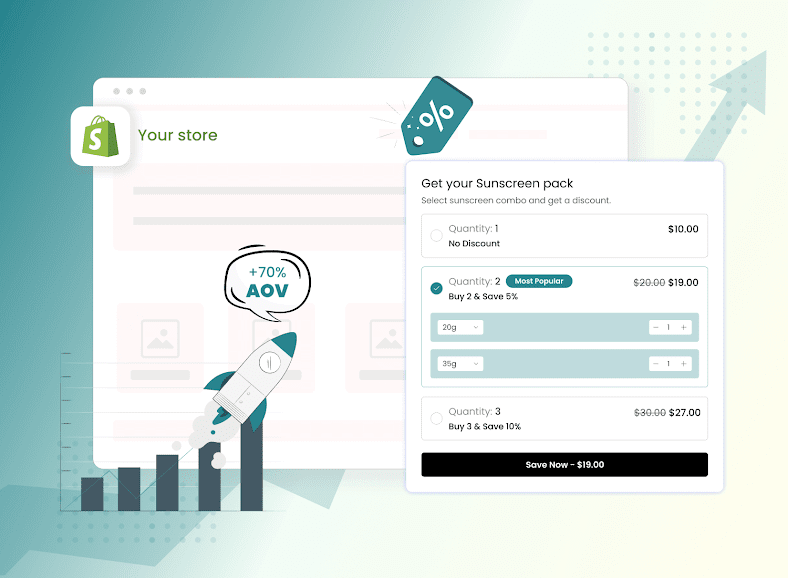
| Mix-and-Match | Customers choose products within limits | Pick any 3 snacks monthly |
| Build-a-Box | Fully customizable bundle experience | Custom grooming subscription |
| BOGO Bundle | Extra item included for value | Subscribe & get 1 free |
| Starter Bundle | Designed for beginners, often mixed cart | One-time trial size + ongoing subscription |
A good bundle subscription solves a clear problem rather than combining unrelated products.
Combining Multiple Subscription Items Into One Delivery
A common question is which platforms let you bundle several different subscription items into a single shared delivery for example, a snack box with five different SKUs that ship and bill together on one schedule, rather than as five separate subscriptions.
Shopify's free native Subscriptions app is built around individual product selling plans rather than true multi-SKU box building — if your model is a curated box with several rotating items on one delivery date, one of the above dedicated apps will get you there faster than the native tool alone.
Best Practices for Bundling Products for Subscriptions
The best practices for bundling products for subscriptions focus on clarity, value, and flexibility. Customers should immediately understand what they get, how much they save, and how often they'll receive it. Keep bundles relevant and straightforward — too many products or options reduces conversions and increases cancellations.
Follow these proven practices:
- Offer 5–15% subscription savings
- Bundle complementary products only
- Limit bundles to 2–5 items
- Provide flexible delivery frequency
- Highlight total savings vs. individual price
- Always keep a one-time purchase option visible alongside the subscription it lowers commitment anxiety and enables mixed-cart trial behavior
| Best Practice | Why It Matters |
|---|---|
| Clear discount | Encourages subscription sign-ups |
| Relevant combinations | Increases perceived usefulness |
| Limited choices | Reduces decision fatigue |
| Flexible frequency | Improves retention |
| Strong product page messaging | Builds trust and clarity |
How to Create Subscription Bundles in Shopify (Step-by-Step)
Shopify doesn't natively support advanced multi-item bundle subscriptions out of the box, so most merchants pair a bundling app with a subscription app once native subscriptions are already turned on (see the setup section above).
Step-by-step setup:
- Set up subscriptions first, either natively or with a third-party app (see above).
- Identify frequently reordered products worth bundling.
- Choose a bundle structure fixed, mix-and-match, or build-a-box.
- Assign a subscription frequency (weekly, monthly, etc.) via your selling plan.
- Offer a bundle discount or free gift on top of the subscription discount.
- Optimize the product page to clearly show total savings and delivery frequency.
- If relevant, enable a one-time purchase option on the same page for mixed-cart flexibility.
Apps like Wizio Bundle, Simple Bundles, and Bundler make this process simple, even for non-technical users.
Key Features That Make Bundles Work
High-performing bundles rely on both smart configuration and strong presentation:
Bundle configuration essentials
- Clear bundle title like "Bundle & Save"
- Total price shown based on quantity
- Compare-at pricing to highlight savings
- Variant selection within the bundle
- Direct-to-checkout option to skip the cart for faster purchase
Subscription widget essentials
- Offer "Subscription only" or "One-time + Subscription" choices
- Use a toggle or checkbox for selection
- Place the subscription option near the bundle for visibility
- Pre-select subscription when the value is obvious
- Highlight benefits like "Subscribe & Save 20% Delivered weekly"
Bundle Apps That Support Subscriptions: Comparison
| Feature | Native Shopify Subscriptions | Recharge | Bold Subscriptions | Wizio (Bundles) |
|---|---|---|---|---|
| Cost | Free | From ~$99/mo + fees | Similar tiered pricing | Free plan + paid tiers |
| Handles recurring billing | Yes | Yes | Yes | No (pairs with a subscription app) |
| Multi-SKU box building | Limited | Yes | Yes | Yes (via integration) |
| Runs in Shopify's native checkout | Yes | Yes (modern versions) | Yes | Yes |
| Bundle merchandising / product-page display | Basic | Basic | Basic | Strong |
| Mix-and-match / Build-a-Box UI | No | Yes | Yes | Yes |
| Best for | Simple, single-product subscriptions | Multi-item subscription boxes at scale | Mid-market stores wanting strong checkout integration | Merchants who want polished bundle merchandising alongside any subscription app |
How Wizio Fits Into Your Subscription Bundle Stack
The Wizio is designed to help merchants increase AOV, improve conversions, and move inventory faster, with minimal setup. It supports multiple bundle types fixed bundles, mix-and-match, Build-a-Box, BOGO, and free gift offers — and is built to work alongside your existing subscription app rather than replace it: Wizio handles how the bundle looks and prices on the product page, while your subscription app (native or third-party) handles the recurring billing itself.
Business problems Wizio solves:
- Low AOV → Encourages multi-product purchases
- Low conversions → Clean, mobile-friendly bundle display
- Slow-moving inventory → Combine with bestsellers
- Poor product pages → Customizable layout and branding
| Wizio Feature | Business Benefit |
|---|---|
| Mix-and-Match / Build-a-Box | Higher engagement and personalization |
| BOGO & Free Gifts | Increased perceived value |
| Flexible pricing display | Clear savings communication |
| Direct checkout option | Faster purchase flow |
| Free plan available | Easy to start for growing stores |
Launch Your First Subscription Bundle (Action Plan)
If you want quick results, start small and optimize over time.
- Select 2–3 products that customers reorder frequently
- Create a fixed bundle with clear savings
- Add a "Subscribe & Save" option
- Highlight the total price and the discount
- Use the Wizio Shopify Bundle App to launch quickly
- Track AOV, conversion rate, and retention
Even one optimized bundle can significantly increase revenue and customer lifetime value.
Even one optimized bundle can meaningfully increase revenue and customer lifetime value.
Install the Wizio Shopify Bundle App
Final Thoughts
By combining Bundles and Subscriptions with the right tools and strategy, Shopify merchants can turn one-time buyers into repeat customers, increase AOV, and build predictable revenue without increasing marketing spend.
Frequently Asked Questions
1. Can Shopify stores combine product bundles and subscriptions?
Yes using Shopify's native Subscriptions app or a third-party subscription app for the recurring billing, paired with a bundling app like Wizio for merchandising and pricing display.
2. How do I set up subscriptions on Shopify?
Install the free native Shopify Subscriptions app, create a selling plan group with your billing interval and discount, and assign it to your products. For advanced box-building or retention tooling, third-party apps like Recharge or Bold are the next step.
3. Can customers buy a one-time item and a subscription item in the same cart on Shopify?
Yes this is called a mixed cart. Modern subscription apps process both item types through Shopify's native checkout as a single transaction. Confirm your chosen app uses Shopify's native checkout rather than a separate third-party one, since older apps sometimes still redirect.
4. Which platforms let me bundle multiple subscription items into one delivery?
Recharge, Bold Subscriptions, Awtomic, and Loop Subscriptions all support multi-SKU subscription boxes with a shared billing and delivery schedule. Shopify's native Subscriptions app is built around single-product selling plans rather than full box-building.
5. What is a good bundle subscription?
One that includes complementary products, clear savings, simple choices, and a delivery schedule that matches how customers actually use the products.
6. Do subscription bundles increase AOV?
Yes customers purchase multiple products together upfront and continue buying through recurring deliveries, compounding the AOV lift over time.
7. How many products should be in a bundle?
Ideally 2–5. Larger bundles can overwhelm customers and reduce both conversion and retention.
8. Should subscriptions be selected by default over one-time purchase?
If the value is clear and savings are strong, pre-selecting a subscription can improve adoption but keep the one-time option visible and easy to switch to, since forcing subscription-only can suppress conversions from hesitant first-time buyers.
9. What types of stores benefit most from bundled subscriptions?
Skincare, supplements, coffee, pet products, grooming, and other consumable-focused businesses with a naturally recurring reorder cycle.
10. Does Wizio handle the recurring billing itself?
No Wizio handles bundle merchandising, pricing display, and layout. Recurring billing is handled by a subscription app, which Wizio is designed to work alongside.