













Offering a free gift on purchase is one of the most effective ways to increase average order value (AOV), improve conversions, and delight customers. Many Shopify store owners, however, struggle with true automation, they want the gift to appear in the cart automatically once a minimum spend is reached, without confusing manual steps for customers.
This in-depth guide explains how to add a free product in Shopify automatically, compares all available methods, highlights common gaps most blogs miss, and helps you choose the right approach based on your store size and goals.
Learn how to add Frequently Bought Together bundles on Shopify with this step-by-step guide, including a detailed video walkthrough.
YouTube Video Link: https://www.youtube.com/watch?v=4by-OA6VCkE
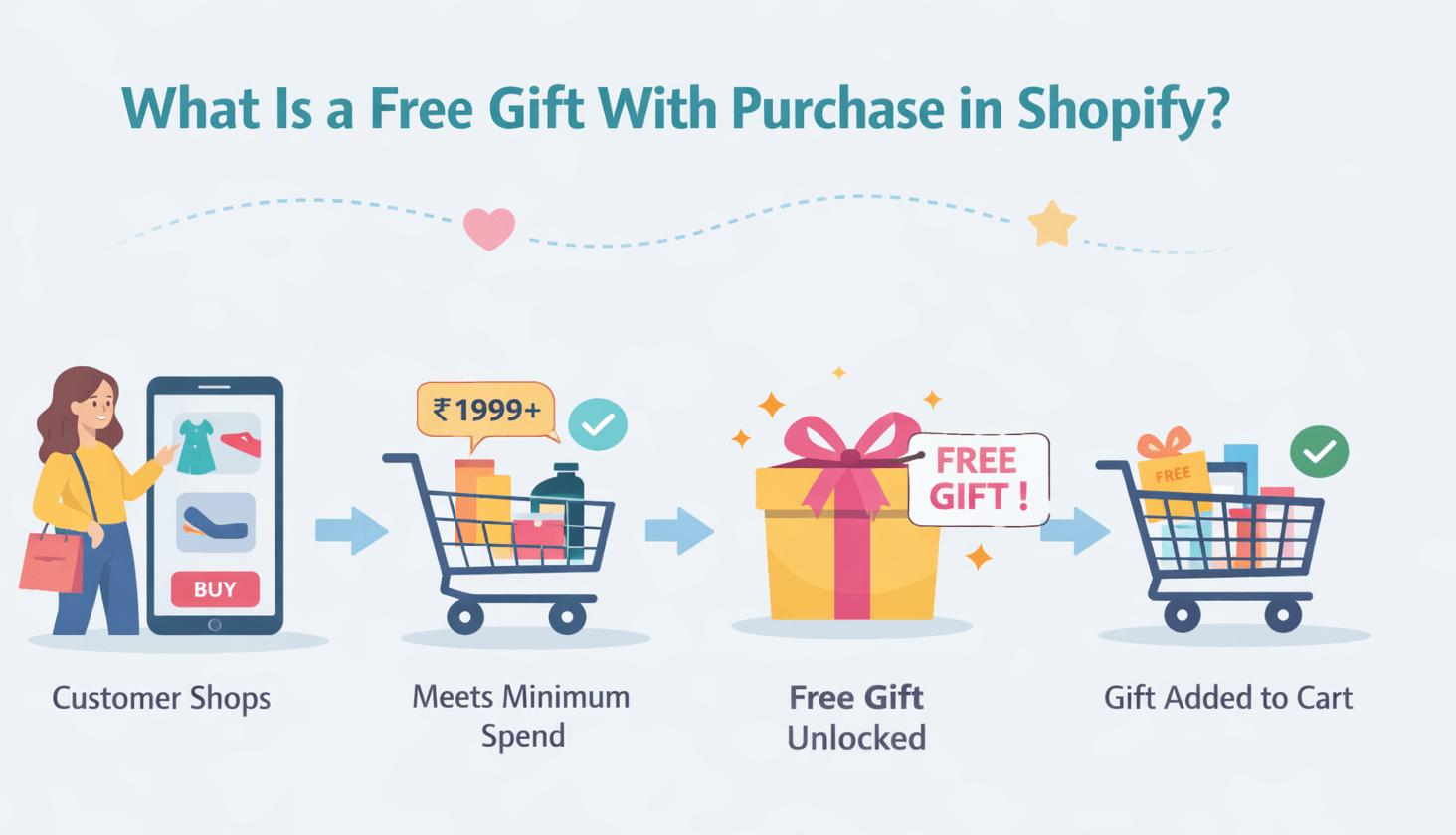
What Is a Free Gift With Purchase in Shopify?
A Shopify free gift with purchase offer means customers receive an extra product for free when their cart meets specific conditions, usually a minimum order value or specific product purchase.
This strategy is widely used during:
- Product launches
- Seasonal sales
- BFCM or festive offers
- Loyalty and retention campaigns
Unlike discounts, free gifts feel like a reward, not a price cut, making them more appealing psychologically.
Why Automatic Free Gifts Convert Better
Manual gift offers often fail because customers:
- Don't notice the promotion
- Forgot to add the gift
- Get confused at checkout
Automatic gift addition solves these problems.
Key benefits of automatic gift logic:
- Removes friction from checkout
- Improves conversion rate
- Increases perceived value
- Reduces support tickets
- Builds trust and transparency
From a UX and CRO perspective, automation is no longer optional, it's expected.
Also Read: https://wizio.app/blogs/free-gift-strategies-to-grow-shopify-aov
Shopify's Native Limitations (Important)
Before choosing a method, it's critical to understand what Shopify cannot do natively:
- Shopify does not automatically add a gift product to the cart by default
- "Buy X Get Y" discounts still require the customer to add the gift manually
- Conditional logic is limited without apps or Flow
- Multi-gift or cart-based automation is not supported natively
This gap is where most store owners get stuck, and where apps and automation tools shine.
Method 1: Using Shopify Apps (Recommended for Most Stores)
This is the most reliable and scalable method to automatically add a free gift to the cart in Shopify for a minimum purchase.
Why Apps Are the Best Option
Apps are built specifically to:
- Monitor cart value in real time
- Automatically add/remove gifts
- Prevent misuse (gift abuse, quantity hacks)
- Support advanced rules
How It Works (Step-by-Step)
Step 1: Choose the Right App
Select an app that supports automatic gift rules, cart conditions, and a clean UX.
One proven option is Wizio Shopify Bundle App, which supports bundles, upsells, and free gift in a single solution.
Step 2: Create an Offer
Define a free gift campaign, such as:
- "Get a free product when cart value reaches ₹1,999."
- "Free sample on orders above $50"
Step 3: Set Conditions
Typical conditions include:
- Minimum cart value
- Specific product or collection
- Customer tags (VIP, wholesale)
Step 4: Configure the Gift
- Select the gift product
- Set price as 100% discounted
- Limit quantity (1 per Order recommended)
Step 5: Promote the Offer (Optional but Powerful)
Use:
- Announcement bars
- Cart drawer messages
- Product page badges
Apps ensure the gift is added and removed automatically if conditions change.
Method 2: Using Shopify Flow (Shopify Plus / Eligible Plans)
Shopify Flow allows automation through workflows, but it's not true cart-level automation.
When Shopify Flow Makes Sense
Flow is useful if:
- You are on Shopify Plus
- You need backend automation
- You accept partial automation
Basic Workflow Example
Trigger
- Cart updated or Order created
Condition
- Cart value greater than X
Action
- Add a specific product
- Tag order or customer
Limitations of Shopify Flow
- Not real-time cart UX
- Limited customer visibility
- Can break with dynamic carts
- Not ideal for storefront promotions
Flow works best as a supporting automation, not a front-end conversion tool.
Method 3: Native Automatic Discounts (Manual Gift Required)
This is Shopify's built-in Buy X Get Y feature.
How to Set It Up
- Go to Discounts in Shopify Admin
- Click Create Discount
- Select Automatic Discount
- Choose Buy X Get Y
- Set purchase condition
- Select gift product
The Big Drawback
Customers must manually add the gift product to their cart.
Even if promoted well, this method:
- Causes drop-offs
- Confuses mobile users
- Reduces conversion rates
Use this only if you want a zero-app setup and accept lower effectiveness.
Best Practices for Free Gift Automation
To maximize results and avoid abuse:
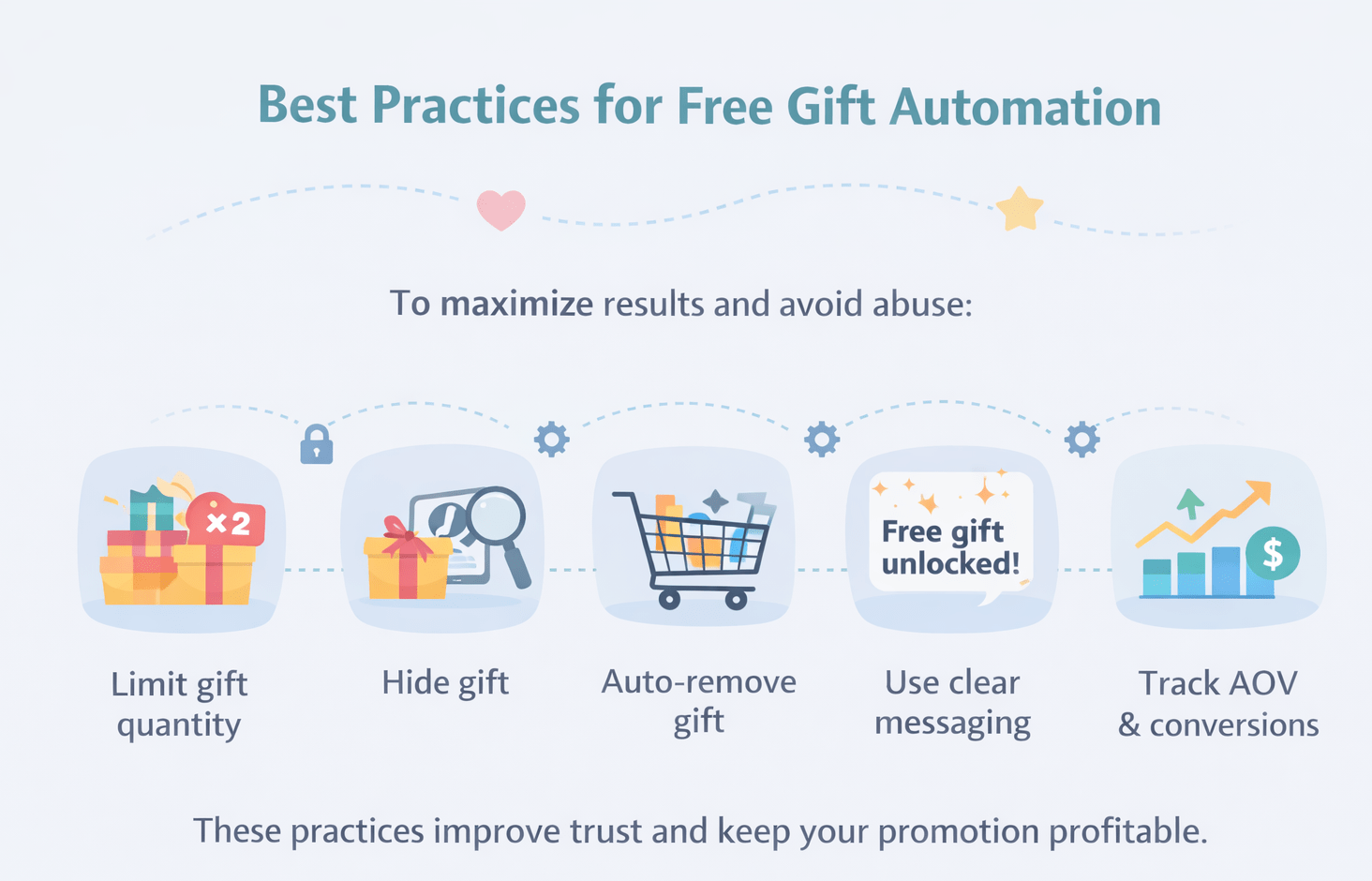
- Always limit gift quantity
- Hide gift from collections/search
- Auto-remove gift if cart value drops
- Use clear messaging ("Free gift unlocked!")
- Track AOV and conversion impact
These practices improve trust and keep your promotion profitable.
Why Wizio Is a Smart Choice for Free Gift Campaigns
Most Shopify stores focus only on discounts, but modern stores need smarter incentives. A free gift on purchase works best when it is fully automated, visible in the cart, and protected against misuse. This is where Wizio stands out as a practical solution.
Wizio allows you to automatically add a free gift to the cart the moment a customer reaches the minimum purchase amount. The gift appears instantly, without requiring any customer action, reducing friction and preventing missed offers that often happen with native Shopify discounts.
Wizio allows you to:
- Combine gifts with bundles
- Create cart drawer promotions
- Increase AOV without discounting core products
Instead of stacking multiple apps, Wizio centralizes revenue-boosting strategies in one place.
Final Recommendation
If your goal is to automatically add a free gift to the cart in Shopify on a minimum purchase, relying on native Shopify discounts alone is not enough. While they work for basic offers, they require manual customer action and often lead to lower conversion rates and missed incentives.
For most Shopify merchants, a dedicated automation solution is the most reliable approach. Using an app that adds and removes gifts automatically, applies cart conditions in real time, and prevents misuse creates a smoother checkout experience and builds customer trust.
Solutions like Wizio allow store owners to move beyond simple discounts and implement revenue-focused promotions that increase AOV without eroding profit margins. When done correctly, free gift campaigns feel rewarding, transparent, and effortless for customers.
Frequently Asked Questions
How do I add a free gift to my cart on Shopify?
To add a free gift to the cart in Shopify, the most reliable method is to use a third-party app that supports automatic cart rules. Shopify's native discounts cannot auto-add gifts, so apps handle real-time cart value checks and insert the free product automatically when conditions are met.
How do I add a freebie on Shopify?
You can add a freebie on Shopify in three ways: using an automation app, Shopify Flow (for eligible plans), or native "Buy X Get Y" discounts.
How do you automatically add a product to the cart on your Shopify store?
Automatically adding a product to the cart requires cart-based automation. Shopify apps monitor cart changes in real time and add or remove products based on rules like minimum order value, product type, or collections.
How to set a minimum order value on Shopify?
You can set a minimum order value in Shopify using automatic discounts, shipping rules, or automation apps. For free gift campaigns, apps allow you to define a minimum cart value and trigger actions, such as adding a free gift, only when that threshold is reached.