













If you're running a Shopify store, you already know how challenging it can be to consistently grow sales without slashing prices or running endless discounts. That’s exactly where quantity breaks come in. Quantity breaks let you reward customers for buying more—while increasing your average order value and keeping your margins healthy.
Boosting your Average Order Value (AOV) doesn’t always require huge discounts or complex marketing tactics. Sometimes, a simple pricing strategy like Quantity Breaks can completely transform how customers shop from your store.
Whether you run a fashion store, beauty brand, or a D2C niche store — people love getting more value for money. And quantity-based pricing taps into that psychology perfectly.
In this guide, you’ll learn:
-
What quantity breaks are
-
Why they work so well
-
How to create quantity breaks on Shopify
-
The easiest way to implement them using Wizio Quantity Breaks & Bundles App
Let’s begin!
What Are Quantity Breaks?
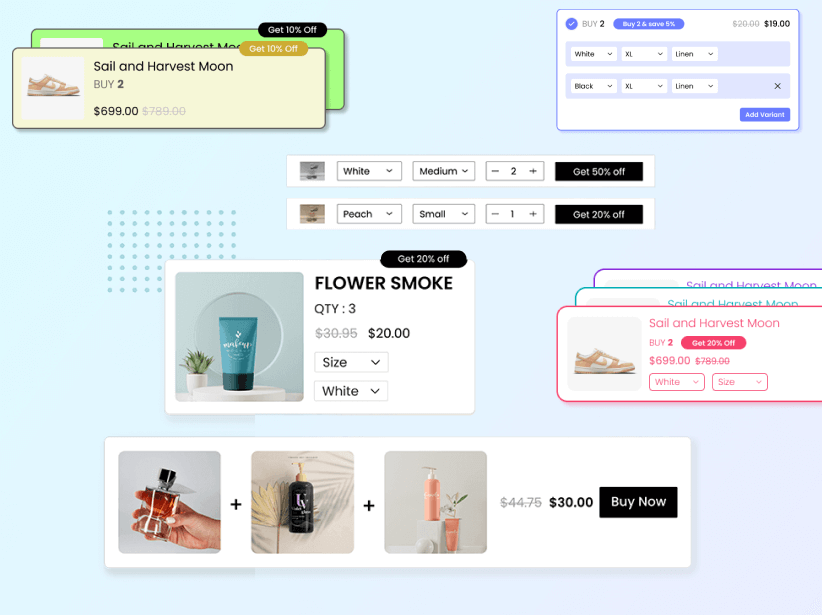
Quantity breaks, also known as volume discounts, are pricing strategies that offer customers a discount when they purchase larger quantities of a product. This tactic not only incentivizes higher volume purchases but also enhances customer loyalty and satisfaction by providing more value for their money.
Implementing quantity breaks on your Shopify store can seem daunting, especially if you're not familiar with coding or the intricacies of your e-commerce platform's backend. However, with apps like Wizio Bundle: Quantity Breaks App, setting up these discounts becomes straightforward and user-friendly.
For example:
-
Buy 2 → Get 10% off
-
Buy 3 → Get 15% off
-
Buy 5 → Get 20% off
This simple strategy helps you increase cart value and move more inventory — without touching your ad spend.
Why Quantity Breaks Boost Sales?
Quantity breaks work because they tap into the fundamental desire for a good deal. By offering a discount at various thresholds, you're not only providing an incentive to buy more but also creating a sense of urgency and exclusivity. This pricing strategy can lead to increased sales volume, higher AOV, and improved inventory management.
Quantity breaks are one of the easiest ways to boost revenue without extra marketing costs. Here’s why they’re so effective:
✔ Encourages Bulk Buying
Shoppers feel they’re getting a better deal when buying more units.
✔ Increases AOV Instantly
Even a 10–15% increase in cart value adds up significantly over time.
✔ Great for Fast-Moving & Consumable Products
Perfect for: skincare, supplements, stationery, household products, etc.
✔ Builds Repeat Customers
When users get more value, they’re more likely to return.
Types of Quantity Breaks You Can Offer
Not every store has the same goals, so here are flexible styles you can use:
1. Percentage Discounts
The Most common one
-
Buy 2 → 10% off, Buy 3 → 15% off
2. Fixed Price Breaks
Great for simple discounting.
-
Buy 2 → Save ₹100, Buy 4 → Save ₹300
-
Example: Buy 3 for ₹999
3. Buy More, Save More Ladder
Combine products with quantity-based logic. Ideal for complementary items.
-
Buy 1 → ₹499, Buy 2 → ₹899, Buy 3 → ₹1,299
4. Volume Pricing or Tier Based Pricing
Prices drop as quantity increases.
-
Example: 1–2 = ₹299, 3–5 = ₹259, 6+ = ₹229
How to Add Quantity Breaks on Shopify Using Wizio?
Shopify doesn’t offer built-in quantity breaks. So you need an app to set it up smoothly — and that’s where Wizio becomes the easiest choice.
Wizio Quantity Breaks & Bundles app helps you create stunning, high-converting discount tiers in minutes.
Step 1: Install Wizio
Go to the Shopify App Store and install Wizio – Bundles & Quantity Breaks.
Step 2: Choose Your Discount Type
Inside the app, pick your preferred quantity break style—percentage, tiered pricing, or fixed bundles.
Step 3: Set Your Quantities & Discounts
Example:
-
2 items → 5% off
-
3 items → 10% off
-
5 items → 20% off
Wizio lets you preview how it will look on your product page.
Step 4: Customize the Design
You can match the discount table and bundle widget to your store branding with just a few clicks. Wizio lets you style everything —
✔ Discount table
✔ Colors
✔ CTA buttons
✔ Messaging
✔ Placement on product page
Step 6: Enable & Publish & Track
Turn it on, and your discount table goes live instantly. You can track your conversions and AOV boosts inside the Wizio dashboard.
Latest Blog Post: Effective Cross Selling Strategies to Increase Shopify sales
Best Practices for High-Converting Quantity Breaks
✔ Keep the tiers simple
2–3 levels work best. Too many choices = decision fatigue.
✔ Highlight savings clearly
Use bold text like “Save ₹300”.
✔ Combine with free shipping for higher tiers
Example: “Buy 3, get free shipping”.
✔ Use urgency messaging
“Popular deal 🔥 — Selling out fast!”
✔ Test different tiers
Use Wizio’s analytics to see which discount structure works better.
Final Thoughts
Quantity Breaks are one of the simplest and most profitable pricing strategies for Shopify stores. When done right, they increase sales, boost AOV, and give customers a strong reason to buy more in one order. With Wizio, you can create beautiful, high-converting quantity break offers without coding or theme edits — in just a few clicks.